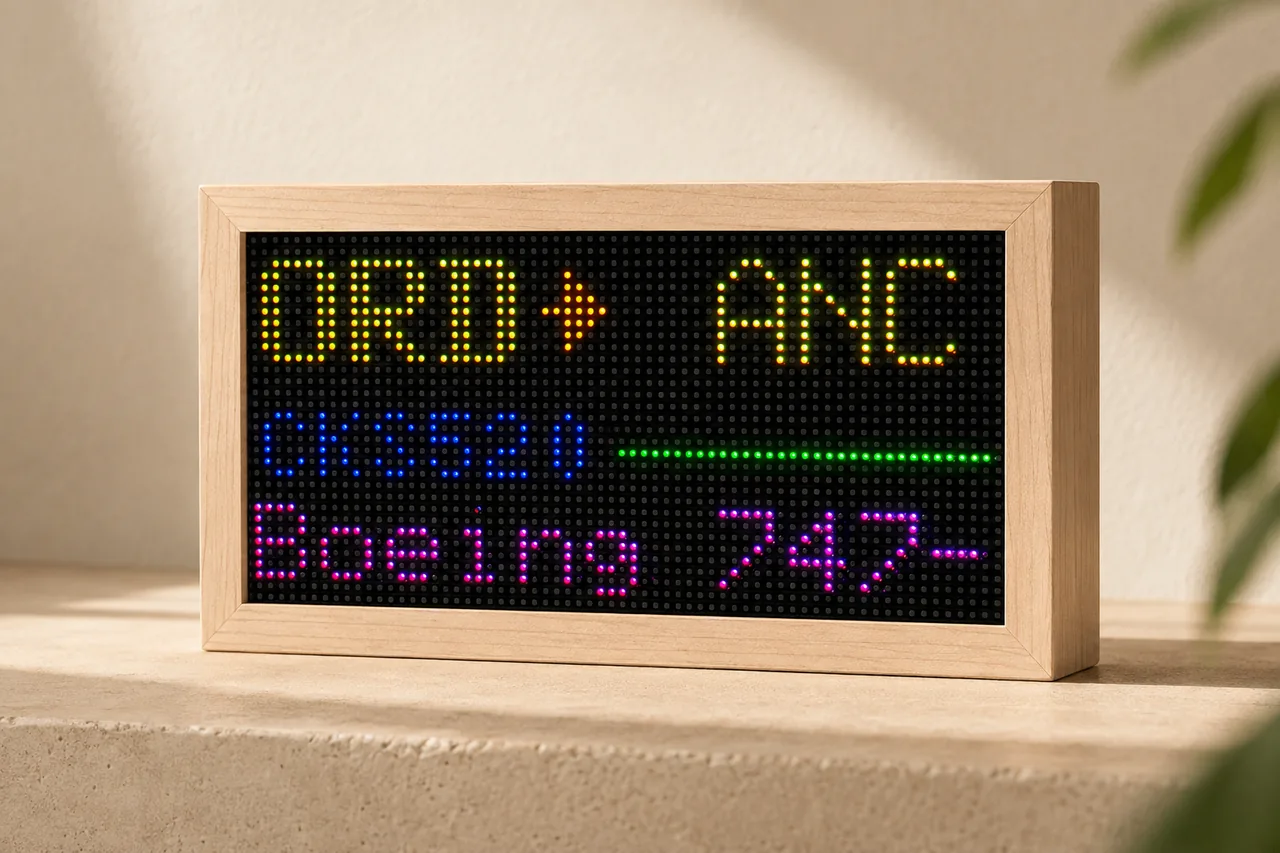
"John has been so helpful. If you have any issues at all, he will graciously walk you through each step, and he responds very quickly. This is a great gift for a plane fanatic — my husband loves it! (And I do too!)"
Every Flight.
Overhead.
Every plane overhead. Every flight number. Live ADS-B data on a 2,048-pixel LED matrix, wrapped in solid maple. No app. No device subscription.


Mach 2.
Built on ESP32-S3 with a full-color 2,048-pixel LED matrix. Pulls live ADS-B data for the Overhead Scanner, follows specific flight numbers, and supports multiple display modes, scenes, brightness settings, and filters — no app required.
| Display | 2,048-pixel LED matrix |
| Processor | ESP32-S3 |
| Data Source | Live ADS-B |
| Power | USB-C / 5V |
| Modes | Overhead, specific flight, Departure Board, scenes |
| Controls | Brightness, filters, tracking area |
| Updates | Free OTA, over Wi-Fi |
| Setup | Browser-based, no app |
| Frame | Solid maple |
What customers are saying.
Every verified review of the Mach 2 — straight from the people who bought one, with their public name and review date.
"The tracker looks great!"
"This is a great gadget and a must have for aviation geeks."
"Absolutely made my husband's Christmas. It is extremely hard to buy for someone who has everything, and this exceeded expectations! Thank you for this amazing little box of fun!"
"Seller was very helpful and I like the product."
"Just as described, can't wait to give it as a gift! Had a little wifi-troubleshooting (just typical resetting/power cycling) but the seller responded very quickly and I got it up and running easily after."
"great product my fiancé loved it!"
"Item just as described and worked well with the instructions provided on the description page."
"We have had the Flight Radar Box about 2 weeks and we have thoroughly enjoyed it. We’ve got it positioned so we can see everything that’s coming over our house. The set up was a little tricky especially connecting to the Internet the seller did try to help us with it . Once we were connected, the rest of the steps were pretty easy. Perfect gift for anyone that loves aviation."
"Amazing product! Purchased for my Dad."
"Great build. Easy set up with instructions!"
"Very well built with a beautiful display. Seller was extremely helpful getting it set up. Wife loved it."
"The seller was super helpful!"
"I sincerely love this item! I had a bit of trouble connecting, as my PC was six years old, and my Mac didn't want to cooperate for whatever reason. But John patiently helped me throughout the process. Truly outstanding customer service! The quality is first-rate, and it's a terrific addition to all my aviation gadgetry. Can't recommend this enough--worth every penny!"
"Awesome device lots of fun"
"Fantastic gift. Instructions were clear and it works great!"
"Product build quality is excellent and the seller provider detailed instructions for setup and configuration. The seller responded almost immediately to me on Christmas Day after I asked some questions! The issues I had turned out to be my own network configuration but I really appreciate the fantastic customer support."
"My husband is a huge aviation enthusiast, so got this for him as a gift for Christmas. It was a huge hit! Super easy to set up, beautiful display, and very fun to see in real time what is flying overhead. Highly recommend, thanks so much!"
"Very responsive seller and an awesome product! Buying another one for a gift."
Up and running in under 5 minutes.
Departure
Board Mode.
Turn your tracker into a personal airport FIDS — showing live departures from any airport, right on your desk. Specific flight tracking and Departure Board mode use a low-cost FlightAware AeroAPI key that you add in the dashboard. If you do not want to create one, reach out and I will help make it work.

Original Flight Tracker boxes.
A short note on why some first-generation FlightTrackerLED boxes stopped updating, what changed, and the two ways I can help.
The original setup became too expensive to keep running the same way.
The first Flight Tracker boxes were Raspberry Pi based and used an earlier API path. Over time, the amount of API traffic those boxes generated became too expensive for me to keep paying for in the background.
The original data setup worked for a long time, but the cost and request volume kept growing. I had to move the platform to something more sustainable so I could keep supporting the boxes without the API bill getting out of hand.
Mach 2 now uses Airplanes.live as the main overhead data source, and the newer firmware is built around redundancy: documented data-source options, configurable providers, and a provider toggle in settings so the user can switch data sources if one API changes, gets expensive, or goes away.
I also have guides for open aviation APIs and alternate data sources, so owners are not locked into one backend forever. If a provider stops making sense, a new one can be switched on from settings without replacing the box.
The focus now is simple: no single data provider should be the whole product. If one API becomes too expensive or stops working, the box has another documented path, and OTA updates give me another way to keep it supported.
Setup Guide
Get your Mach 2 connected and tracking flights in a few minutes. All you need is the included USB-C cable and a computer running Chrome or Edge.
Step 1 — Connect via USB
Flight Tracker Mach 2 uses USB Web Serial for setup — no app downloads, accounts, or Bluetooth pairing needed. When the display first powers on, it cycles through setup instructions on the LED matrix.
- Plug in your Flight Tracker to your computer using the included USB-C cable.
- Open Chrome or Edge on your computer and go to setup.flighttrackerled.com.
- Click "Connect Device" — your browser prompts you to select a USB serial device. Choose your Flight Tracker.
Step 2 — Connect to Wi-Fi
- Click "Scan Networks" to see nearby Wi-Fi networks.
- Select your home network from the list, or type the SSID manually.
- Enter your Wi-Fi password and click "Save and Connect."
The display will restart and connect. Once online, the LED matrix confirms the connection. You can unplug the USB cable from your computer — the tracker runs on its own from any standard 5V USB-C power source.
Step 3 — Set Your Location
Open the built-in settings dashboard at the tracker's IP address, shown on the LED matrix at startup. You can use any device on the same Wi-Fi network for this step, including a phone or tablet.
Option A — Search by Address
- Type your address, city, or ZIP code into the location field.
- Click Search — the dashboard sets your coordinates and creates a 20-mile tracking area.
- Click Save.
Option B — Custom Area
- Go to bboxfinder.com and draw a rectangle around your area.
- Copy the URL and paste it into the Custom Boundary field on the dashboard.
- Or use the dashboard presets for a quick 20-mile or 40-mile tracking radius.
Step 4 — Add FlightAware for Advanced Modes
Specific flight tracking and Departure Board mode need a FlightAware AeroAPI key. It is usually inexpensive for normal personal use, and it lets Mach 2 request live flight status and airport board data. Keep it private, just like a password.
- Go to flightaware.com/aeroapi/signup/personal.
- Create or sign in to your FlightAware account.
- Choose the Personal AeroAPI tier if you are using the display for personal or academic use.
- Review FlightAware's current pricing and included monthly credit before enabling it.
- Copy your AeroAPI key from the FlightAware portal and paste it into the Mach 2 dashboard.
Step 5 — Choose a Tracking Mode
Specific Flight Tracking
- Open the display mode selector and choose Specific Flight or Track Flight.
- Enter an airline code plus flight number, such as UA970, AA100, or DAL123.
- Click Save or Apply. The display looks up the flight and shows live route, timing, position, altitude, and speed when available.
Departure Board
- Choose Departure Board from the dashboard.
- Enter the airport code you want to watch, such as ORD, LAX, or JFK.
- Set departures, result count, and refresh frequency if those controls are available.
Step 6 — Customize Your Display
- Adjust brightness — Dial it to match your room.
- Switch display modes — Move between Overhead Scanner, specific flight tracking, Departure Board, clock, scenes, and other apps.
- Set flight filters — Filter by altitude, distance, or aircraft type.
- Update choices anytime — Change tracked flight numbers, airports, tracking areas, and preferences from the dashboard.
Your Mach 2 receives free OTA updates automatically — new features ship straight to your display over Wi-Fi.
Troubleshooting
- Device not showing up? Use Chrome or Edge on desktop. Try a different cable or USB port.
- "Firmware did not answer"? Unplug, wait a few seconds, replug, click Connect again.
- No flights showing? Try the 40-mile preset or draw a larger area on bboxfinder.com.
- Specific flight not found? Confirm the flight is active today and use the airline code plus flight number exactly as shown on FlightAware.
- Departure Board is blank? Check the airport code, AeroAPI key, result count, and refresh interval.
- Worried about API usage? Increase the refresh interval, reduce displayed flights, and check FlightAware's My AeroAPI usage page.
- Can't access dashboard? Make sure your device is on the same Wi-Fi as the tracker.
- Need to start over? Use Clear WiFi on the setup page to reset network settings.
- Still stuck? Contact us — we respond quickly.
Overhead Scanner
The main Mach 2 scene. Set your home location, define the sky you care about, and watch nearby aircraft appear as live snapshots arrive.
A live window into the traffic above you.
Overhead Scanner uses your saved tracking area, altitude filters, and display preferences to show nearby flights on the LED matrix. The box publishes your settings, the cloud builds a fresh flight snapshot, and Mach 2 renders the current aircraft list locally.

Boundary in, snapshot out.
Your dashboard stores a home point, a tracking boundary, airport code, brightness, and filters. When settings are saved, the box republishes them and waits for the next cloud snapshot.
Start with your address.
Use the location search for a simple 20-mile area, pick the 40-mile preset for more traffic, or paste a bboxfinder.com boundary if you want precise control.
Make the display match your sky.
Adjust brightness, altitude range, distance, aircraft detail fields, and other display preferences from the local settings dashboard.
Using Overhead Scanner
- Open the dashboard. Use the IP address shown on the matrix after the box joins Wi-Fi.
- Set your location. Search your address or paste a custom boundary from bboxfinder.com.
- Choose filters. Narrow by altitude, distance, and the details you want shown.
- Save settings. The box republishes your settings and the display updates when the next snapshot arrives.
If flights do not show right away
Give it a moment after saving. The box has to publish settings, receive a fresh snapshot, and apply it to the display.
Expand the area. If traffic is light, try the 40-mile preset or a larger custom boundary.
Check filters. A narrow altitude range or distance limit can hide flights that are otherwise available.
Check Wi-Fi and sync. If the dashboard says the box is waiting for a snapshot, leave it connected and refresh status after a few seconds.
Individual Flight Tracker
Lock Mach 2 onto one flight number and follow its route, timing, status, aircraft, altitude, and speed as live data becomes available.
For the flight you actually care about.
Enter a flight number like UA970, UAL970, AA100, or DAL123. Mach 2 saves the request, switches to the tracker scene, and updates as the cloud resolves the live flight and publishes status back to the box.

One callsign, richer context.
The tracker stores your requested flight number, uses the shared FlightAware cloud key when needed, and then follows the active flight as live data comes in.
Type the flight, press Track.
Open the dashboard, go to Track Flight, enter the airline code plus number, and press Track. The scene may show searching while the first live snapshot loads.
Status at a glance.
Depending on the data available, the display can show callsign, route, aircraft type, flight status, estimated time remaining, altitude, and speed.
Tracking a specific flight
- Add the FlightAware key. Specific flight tracking uses the shared FlightAware cloud key stored securely for your box.
- Enter the flight number. Use the airline code plus number, with no spaces unless the dashboard asks for separate fields.
- Press Track. The dashboard saves the request and switches the box to the tracker scene.
- Wait for the first result. Scheduled and predeparture flights can take a little longer to resolve than flights already in the air.
If a tracked flight looks stuck
Give the scene time after switching. The box changes scenes first, then waits for the cloud to resolve and publish the live flight snapshot.
Check the identifier. Try the flight number exactly as shown on FlightAware, including the airline code.
Confirm the flight is active today. Future, canceled, or completed flights may not have live position data yet.
Check the cloud key. If the dashboard shows no FlightAware key, use Secure Submit or contact me and I will help get it working.
Departure Board
Turn Mach 2 into a small airport board for one airport and airline, with live departure status delivered through the shared FlightAware cloud key.
A tiny FIDS for your desk.
Choose an airport, choose an airline, pick a refresh interval, and start the scene. Mach 2 requests the latest departure board data and lays it out on the LED matrix like a miniature terminal display.

Airport plus airline.
The dashboard asks for a 3-letter airport IATA code, like ORD, and a 3-letter airline ICAO code, like UAL. The board shows matching departures by time.
Save, then start.
Enter the airport, airline, and refresh interval, press Save Settings, then start Departure Board. The first live result can take a moment to appear.
Balance live data and usage.
Start around 10-15 minutes for a normal desk display. Shorter intervals feel fresher; longer intervals reduce FlightAware API usage.
Starting Departure Board
- Add the FlightAware key. Departure Board uses the shared key stored securely for your device.
- Enter airport and airline. Use IATA for the airport, like ORD, and ICAO for the airline, like UAL.
- Choose refresh interval. Two minutes is available, but 10 minutes is a better everyday starting point.
- Save settings and start. After switching scenes, give the box a little time to fetch and render the first live board.
If the board is blank at first
Wait after switching scenes. Departure Board may take a second before the box updates and the first live results appear.
Save settings first. Airport, airline, and refresh interval still need Save Settings before the scene has the latest values.
Check code types. Use airport IATA codes like ORD/LAX/JFK and airline ICAO codes like UAL/AAL/DAL.
Check the FlightAware key. If you do not want to create one or hit a snag, email or text me and I will help make it work.
Powered by Airplanes.live.
FlightTrackerLED uses live aircraft data from Airplanes.live, an independent ADS-B and MLAT community built by aviation people, for aviation people.
The data matters as much as the hardware.
A flight display is only as good as the network behind it. I chose Airplanes.live because they are independent, community-driven, and focused on keeping aircraft tracking useful for hobbyists, builders, researchers, journalists, emergency services, and anyone who simply loves watching the sky.
They are not trying to turn a shared hobby into someone else's locked-down asset. Their organization is structured around long-term access, community trust, and unfiltered aviation data instead of a quick exit to the highest bidder.
Most of us got into this because it is fun to look up, wonder where a plane is going, and share that curiosity with other people. Airplanes.live feels aligned with that version of the hobby: open, useful, enthusiast-led, and built to last.
Independent by design
Airplanes.live was formed by aviation enthusiasts and coders who wanted a stable home for aircraft tracking data. Their public commitment is that ownership cannot simply be sold, transferred, or taken over by one person.
Unfiltered tracking data
Their network aggregates ADS-B, Mode S, and MLAT data from enthusiast receivers and makes it available through a live map and API, with a strong stance against unnecessary filtering or obfuscation.
Built for the community
The point is not to squeeze the hobby for maximum profit. The point is to keep the data accessible, useful, and available to the people who feed it, build with it, and care about it.
A handmade box, powered by a community network.
Mach 2 turns aircraft data into something physical: a small display on your desk, shelf, or nightstand that reacts to the aircraft moving through your sky. Airplanes.live provides the kind of independent aviation data backbone that makes that experience feel connected to the wider tracking community.
I want FlightTrackerLED to support groups that protect the hobby rather than extract from it. Airplanes.live is one of those groups.
Built by a Plane Spotter
FlightTrackerLED started as a personal project. It turned into something others wanted on their desks too.

A display for obsessives.
I live under a busy flight path, and I have always looked up when a plane passes over — wondering where it is going, what airline it is, and what aircraft is making that sound. I wanted something on my desk that answered those questions the moment a flight appeared overhead.
Hardware, software, and carpentry have all been long-running passions of mine, and Mach 2 sits right at that intersection. The first prototype ran on a Raspberry Pi. It worked, but it was slow to boot, unreliable, and fussy to set up. I rebuilt it from scratch on ESP32-S3 for faster startup, lower power, and no SD card to corrupt, then built a maple enclosure because the object deserved to feel as good as the data.
There is no team, no office, and no factory line. It is just me. I hand make every single box, program each display, test it, pack it, and ship it myself. The best part is that I can keep building new scenes and features after it leaves my shop, then send them straight to your Mach 2 with OTA updates.
If the FlightAware key for specific flight tracking or Departure Board ever feels like a barrier, please email or text me. I care more about people getting to enjoy this than about making setup feel complicated, and I will help find a way to make it work.
Frequently Asked Questions
Can't find your answer? Contact us and we'll help.
The original boxes used an earlier API path. Over time the request volume and API costs kept growing, and I needed a more sustainable setup so I could keep supporting customers without the bill getting out of hand.
Yes. Mach 2 uses Airplanes.live as the main overhead data source, runs on much more powerful hardware, and has OTA updates so fixes and provider changes can be shipped over Wi-Fi.
The newer setup has provider settings built in. A different data source can be switched on from settings, like a toggle, without replacing the box.
That is the goal. I am committed to keeping these boxes running as long as I can, and redundancy is the best path forward: multiple data options, open API guides, and OTA updates.
Flight Tracker Mach 2 is a handmade ESP32-S3 LED matrix display that tracks flights in real time. It shows planes flying overhead, lets you follow specific flight numbers, supports multiple display modes and scenes, and receives free over-the-air updates so it keeps improving after it arrives.
- 64×32 LED matrix in a solid maple frame
- ESP32-S3 controller board (pre-installed)
- USB-C cable for setup and power
- Quick start card with setup instructions
Plug the included USB-C cable into any standard 5V USB-C power source — no separate computer connection is needed after Wi-Fi setup.
There is no FlightTrackerLED device subscription, monthly fee, or hidden device cost. OTA updates and support are included. Some optional advanced modes, such as specific flight tracking and Departure Board, use a FlightAware AeroAPI key that you manage through FlightAware.
- ESP32-S3 instead of Raspberry Pi — faster boot, lower power, more reliable
- Guided USB setup — no terminal commands or config files
- OTA updates — new features ship automatically
- Built-in settings dashboard — configure from any browser on your network
- Handmade and tested — every unit quality-checked before shipping
Every Mach 2 is individually assembled, programmed, tested, and quality-checked by hand before shipping. These are not mass-produced units; each display is built with care around the maple frame, LED matrix, and pre-installed controller.
- Plug into your computer with the USB-C cable.
- Open Chrome or Edge, go to setup.flighttrackerled.com.
- Click Connect Device and follow the steps to join Wi-Fi.
- Open the tracker's IP address in any browser to set location and customize.
Chrome and Edge on desktop support Web Serial. Safari, Firefox, and mobile browsers do not. After initial setup, any browser works for the settings dashboard.
The initial Wi-Fi setup requires a desktop or laptop running Chrome or Edge because mobile browsers do not support Web Serial. After the tracker is on Wi-Fi, you can open the settings dashboard from any device on your network, including a phone or tablet.
Search by address for an automatic 20-mile area, or go to bboxfinder.com to draw a custom boundary and paste the URL into the dashboard.
The tracker automatically re-enters setup mode when it can't connect. Plug it in via USB and re-enter your credentials at setup.flighttrackerled.com.
Yes. Enter any active flight number (e.g. UA123, BA456) in the settings dashboard. Your display follows that flight in real time — altitude, speed, route — until it lands.
Your tracker monitors live ADS-B flight data inside your configured tracking area. It shows nearby aircraft with details like airline, flight number, aircraft type, altitude, speed, and route as planes enter and leave your area.
Mach 2 supports multiple apps, scenes, and display modes from the settings dashboard, including Overhead Scanner, specific flight tracking, ambient scenes, and airport-style board features. New modes can arrive through free OTA updates.
The tracker checks for updates automatically over Wi-Fi. New features, modes, and fixes download and install in the background — no action required, always free.
Yes to both. Brightness is adjustable from the dashboard. You can also filter by altitude, distance, and aircraft type to see exactly what you want.
Yes. Departure Board and specific flight tracking use a FlightAware AeroAPI key that you add in the dashboard. For normal personal use it is usually a cheap key, and you can start with a 10-15 minute refresh interval to limit API usage. If you cannot afford one or simply do not want to create one, email or text me and I will help make it work for you.
Worldwide. Each unit is handmade to order — please allow a few business days for assembly and testing. International orders may be subject to customs duties.
We want you to be completely happy. If something isn't right, contact us and we'll make it right.
USB-C, 5V. Any standard USB-C charger works — phone charger, computer, or USB wall adapter. Once Wi-Fi is configured, it runs on its own with no computer attached.
Every Mach 2 includes direct lifetime support from me. There is no outsourced support queue. If you run into setup, configuration, FlightAware, or tracking issues, contact me. I am available day and night and will help you get sorted.
Still have questions?
Shipping & Return Policy
Plain-language order, shipping, return, and support terms for FlightTrackerLED.
Shipping Policy
Please note: Every FlightTrackerLED display is handmade to order by a single maker. Each unit is built, programmed, and tested by hand before it ships, so processing times can vary depending on order volume and component availability. I always work to get orders out as soon as possible.
Processing Time
Because each FlightTrackerLED is built individually, please allow 3-10 business days for your order to be assembled, programmed, and tested before it ships. Most orders ship sooner, but during periods of high demand or limited component supply, processing may take longer. If your order requires extended processing time, I will contact you by email at the address provided at checkout.
Shipping Methods & Delivery Time
- Domestic orders: shipped via USPS or UPS with tracking. Typical delivery time after shipment is 2-5 business days, depending on destination and the shipping option selected at checkout.
- Express or priority shipping: available at checkout when supported. Express shipping speeds up transit time, but it does not change processing time unless arranged in advance.
- International orders: available on a case-by-case basis. Please contact john@flighttrackerled.com before ordering.
Tracking
Once your order ships, you will receive a shipment confirmation email with the carrier and tracking number. Please allow 24 hours for tracking updates to appear in the carrier system after the label is created.
Shipping Address
It is the customer's responsibility to provide a complete and accurate shipping address at checkout. FlightTrackerLED ships to the address provided on the order. If a package is returned as undeliverable because of an incorrect or incomplete address, the customer is responsible for the cost of re-shipping.
Lost, Delayed, or Damaged Shipments
If tracking shows your package as delivered but you have not received it, please first check with neighbors, family members, your front desk or building manager, and your local post office. If you still cannot locate it, contact john@flighttrackerled.com within 7 days of the marked delivery date so I can help open a carrier investigation.
If your package arrives damaged, contact me within 7 days of delivery with photos of the packaging and the product. I will work with you to repair, replace, or otherwise make it right.
Setup & Customer Support
Every FlightTrackerLED is tested before it ships. If you run into setup difficulty, please reach out. I respond as quickly as possible and will help you get your display working.
Made-to-Order Disclosure
Because each unit is built individually for the customer, FlightTrackerLED does not maintain a same-day shipping inventory. Thank you for your patience and for supporting a small, owner-operated maker business.
Return & Refund Policy
FlightTrackerLED displays are handmade to order by a single maker. Each unit is built, programmed, and tested by hand for the customer who ordered it. I stand behind every unit shipped and want every customer to enjoy theirs.
30-Day Return Window
You may request a return or refund within 30 days of the delivery date of your order. Requests received after 30 days from delivery are not eligible for return or refund except where required by applicable law, or at my discretion in cases of clear product defect.
Conditions for a Refund
- The return request is made within 30 days of delivery.
- The item is returned in its original, unaltered condition, with all original packaging and accessories.
- The item has not been physically modified, taken apart, or had its firmware or hardware tampered with. Tampering or attempted modification voids return eligibility.
- The customer obtains a Return Authorization from FlightTrackerLED by emailing john@flighttrackerled.com before shipping anything back. Returns sent without authorization may be refused.
- Return shipping is the responsibility of the customer except in cases where the unit arrived defective or damaged.
Defective or Damaged on Arrival
If your unit arrives damaged or has a manufacturing defect, please contact john@flighttrackerled.com within 7 days of delivery with photos of the packaging and the product. I will repair, replace, or refund as appropriate at no additional cost to you.
Setup Issues
Many "it doesn't work" reports turn out to be straightforward setup questions. Before requesting a return, please contact me. I routinely walk customers through setup, and where a customer's unit cannot be made to work remotely, I will offer a free repair, replacement, or upgrade. Most setup issues are resolved without any return being necessary.
Non-Returnable Items
- Custom-built units that include personalized text, custom graphics, or buyer-specified hardware modifications.
- Units that have been physically opened, tampered with, or had their firmware extracted or modified.
- Items returned more than 30 days after delivery.
Refund Processing
Once a returned unit is received and inspected, I will notify you of the outcome. Approved refunds are issued to the original payment method, typically within 3-7 business days of inspection. Original shipping charges are non-refundable.
Chargebacks
Customers who experience an issue are asked to please contact john@flighttrackerled.com first. As a small, owner-operated maker business, I will always work in good faith to repair, replace, or refund promptly. Filing a chargeback before contacting me, or while remediation has already been offered and accepted, prevents me from helping resolve the issue and may delay the resolution.
Contact
For any return question or special request, please email john@flighttrackerled.com. I aim to respond within one business day.
The Mach 2
A finished handmade flight tracker display for the Overhead Scanner, specific flight tracking, Departure Board mode, scenes, filters, and free OTA improvements.

Live ADS-B flight tracking on a 2,048-pixel full-color LED matrix. Watch overhead aircraft, follow specific flight numbers, open Departure Board mode, switch display modes, adjust brightness, and filter what appears. Set up in minutes, configure from any browser, and get free OTA updates for life.
- 64×32 LED matrix in solid maple frame
- ESP32-S3 controller board (pre-installed)
- USB-C cable for setup and power
- Quick start card
- Overhead Scanner, specific flight mode, Departure Board mode, scenes, and filters
- Free lifetime OTA updates
- Free lifetime support
Built for flight tracking and beyond.
Track individual flights by flight number, watch planes overhead in real time, open Departure Board mode, or switch to one of the built-in display modes. Mach 2 runs on ESP32-S3 and gets free OTA updates so it keeps improving after it arrives.
Track Any Flight
Enter a flight number and follow a specific flight in real time, or let Mach 2 scan for aircraft passing through your area automatically.
Multiple Display Modes
Switch between apps, scenes, and visualizations, including Departure Board, clock, weather, custom text, and more.
Free OTA Updates
New features and improvements ship over the air. Your display keeps getting better long after it arrives.
Fully Customizable
Adjust brightness, filters, tracking zones, and display preferences so the display fits your space exactly.
From unboxing to tracking.
Mach 2 connects to Wi-Fi through the browser setup tool at setup.flighttrackerled.com, then pulls live flight data from ADS-B sources and displays it on a 2,048-pixel LED matrix. After it is on your network, use the built-in settings page to configure location, modes, filters, and brightness.
Plug in & connect
Plug Mach 2 into your computer with USB-C, open setup.flighttrackerled.com in Chrome or Edge, then connect the display to Wi-Fi.
Configure settings
Once Mach 2 is online, open its settings page from the same Wi-Fi network to set your location, tracking zone, brightness, filters, display mode, and Departure Board preferences.
Watch flights live
Aircraft data streams in real time from ADS-B sources, including flight numbers, airlines, altitude, speed, and aircraft type.
Track specific flights
Enter any flight number to follow a specific plane. The display shows its route and status until it lands or leaves range.
Everything you need, nothing you don't.
What's under the hood.
How Mach 2 compares.
Both are real-time LED flight displays. Where Mach 2 differs comes down to how it's built, who's behind it, and how it's set up.
Mach 2 Drop In
A replacement ESP32-S3 controller and USB-C power setup for people who already own a legacy FlightTrackerLED box and want the newer Mach 2 electronics.
For owners of the legacy Raspberry Pi-based FlightTrackerLED box. Keep your existing LED matrix and enclosure, remove the Raspberry Pi wiring, connect the HUB75 ribbon and power leads to the new ESP32-S3 board, then power it up over USB-C.
- Mach 2 ESP32-S3 controller board, programmed and tested
- USB-C power setup for the new controller
- Mach 2 firmware with OTA updates and current scenes
- Access to Overhead Scanner, specific flight tracking, Departure Board, settings, and filters
- Direct install support if you want help swapping it in
This kit is only for existing owners of the legacy FlightTrackerLED box. If you are unsure, message me first with your order number before purchasing.
Keep the box. Swap the brains.
The Drop In kit is meant to make the upgrade as simple as possible for legacy boxes. You are not rebuilding the enclosure or replacing the LED matrix. You are moving the existing HUB75 and power connections from the Raspberry Pi setup to the Mach 2 ESP32-S3 controller.
Unplug the legacy controller
Power down the box, then disconnect the current HUB75 ribbon and power wiring from the Raspberry Pi hardware.
Connect the Mach 2 board
Plug the existing HUB75 ribbon and display power leads into the new ESP32-S3 controller board.
Power with USB-C
Connect USB-C power, boot the board, and use the current setup flow to get it onto Wi-Fi.
Configure and update
Set your location, modes, filters, brightness, and FlightAware key, then keep getting Mach 2 OTA updates.
Made for legacy FlightTrackerLED boxes.
MatrixPortal Dev Kit
The same handcrafted wood display hardware as a blank canvas for your own code. No pre-loaded apps. No refunds. Built for developers and makers.
Your canvas, your code. This is finished hardware — screen, frame, controller, and power — ready for you to build whatever you want. Flash your own firmware, build your own apps, or use the included development infrastructure to get started faster.
- Adafruit MatrixPortal ESP32-S3 controller board
- 64×32 RGB HUB75 LED matrix installed in enclosure
- Handcrafted wood frame, assembled and finished
- 5V 5A power supply and USB-C cable
- MQTT broker access for real-time data push and remote control
- Admin panel, device provisioning flow, backend API access, and hosted OTA update pipeline
- Compatible with Arduino, CircuitPython, and ESP-IDF workflows
Dev Kits are sold out right now. Tell me what you want to build and I will get back to you within 12 hours.
We're Here
Questions about setup, your order, or anything else — we'll get back to you fast.
Say Hello.
Every Mach 2 comes with direct lifetime support from me. If you need help with setup, FlightAware, a specific flight, Departure Board, or anything else, email or text me. I am available day and night and will always help, which is not something every flight box on the market can say.
Updates & field notes
This week
v1.06 - stronger API and flight lookup
This is a reliability firmware release, not a flashy scene release. The goal is to make the existing tracking path steadier before the next bigger backend step lands.
What changed:
- More tolerant API path - the box handles provider hiccups, stale responses, and partial flight data more gracefully.
- Stronger flight lookup - callsigns that change shape, delayed route data, and upstream disagreements are less likely to knock tracking off course.
- Steadier individual flight tracking - tracked flights should get stuck less often and recover better when a provider sends old or incomplete data.
The free individual flight tracker backend is the next bigger step and is coming in v1.07. v1.06 is the cleanup release that makes that path more dependable.
v1.05 — infrastructure release
Mostly under-the-hood work this week. v1.05 isn't about new visible features — it's the foundation that makes the next few releases possible. You'll feel it as faster data, fresher routes, and fewer ghost disconnects.
What changed:
- Faster overhead data — the Overhead Scanner now updates in near-real-time instead of waiting on a fixed refresh interval.
- Redundant data path — a secondary feed is wired up alongside Airplanes.live so the box keeps tracking if the primary has a hiccup, with smarter handling when sources disagree.
- Cleaner tracked-flight rendering — leaner data on the wire frees up cycles for the matrix.
- Smarter route lookups — the box self-corrects when a flight's route info goes stale.
- Fresher route cache — flight numbers and route metadata update more often.
- Tighter network hygiene — fewer false disconnects, faster pickup of new patches.
- More resilient first-boot — the handoff from the production flasher is sturdier.
What this isn't: v1.05 doesn't add new user-visible scenes. The bigger feature work (live mode for tracked planes, night mode, alerts, specific plane alerts, most-tracked view) is in active development — see the Roadmap cards below — and is targeted for v1.07+.
v1.05 has shipped through OTA. If your box has not picked it up yet, use Settings → Firmware → Check for update.
Departure Board blackouts, gone.
Patch for the issue a few of you reported in the Hangar — Departure Board would briefly blank for ~10 seconds when the upstream feed returned an empty response. The renderer now treats empty responses as "hold last frame" instead of clearing the matrix.
- Fix: empty schedule responses no longer clear the display
- Fix: small wrap issue on long flight callsigns
- Improvement: lower memory footprint in Departure Board scene
OTA goes out tonight — your box will pick it up automatically.
Launch promo: first 20 boxes at $369
The Mach 2 is officially in production. To say thanks to the early supporters, the first 20 boxes ship at $369 — code BVJ00HHNBPHJ auto-applies if you click through the promo bar at the top of the site.
Once those 20 are gone the price returns to standard. No countdowns, no fake urgency — just a real limit because each box is built by hand.
Most-tracked plane, live
Goal: a scene that pulls whichever aircraft the global tracking community is watching most right now and renders its position on your matrix — not just what's overhead, but what the world is collectively curious about.
How you'll see it: the top tracked aircraft rotate through your matrix on a configurable dwell, with a small callsign + altitude readout in the corner.
What it feels like: a search-and-rescue heli over the BC coast, a delayed transcontinental that picked up a thousand watchers mid-flight, the occasional head-of-state jet. A tiny window onto whatever's holding humanity's attention in the sky right now.
Scene will be opt-in and disabled by default — turn it on when you want a quieter version of "the news through pixels". Targeting a later firmware release.
Overhead scanner gets sharper
Big update. The Overhead Scanner now smooths motion between data updates, which makes traffic feel like it's actually moving across the sky rather than teleporting.
- Smoother motion between updates
- New altitude-band color ramp (configurable)
- Filter by aircraft type from the dashboard (jet / prop / heli)
- Fixed: rare crash on certain callsigns
Earlier this month
Drop-In replacement for existing users
If you already own an original FlightTrackerLED box, the Drop-In is the upgrade path: keep your maple enclosure, swap the brain. You ship me back the old controller, I ship you a new Mach 2 board pre-flashed with the latest firmware, and you pop it into the same frame.
How the swap works, briefly:
- Order the Drop-In from the store (verification at checkout — original-owner only).
- I email a prepaid return label for your old controller.
- Your new Mach 2 board ships within ~3 business days, pre-paired with your account so it boots straight into setup.
- Open the back panel, unscrew two M3s, lift out the old board, drop in the new one, reconnect the matrix ribbon. ~5 minutes.
- Run through the browser setup wizard once and you're on the latest firmware (currently v1.06) with OTA updates from there.
No new enclosure, no new sale price — just the parts that needed updating.
Specific plane alerts
Goal: follow individual aircraft. Add tail numbers (N12345) or callsigns (UAL2293) to a per-box watchlist. The matrix flashes a small marker and — if you've got Alerts on — pings your phone when a watched aircraft enters your overhead window.
Tail number vs callsign:
- Tail number reliably identifies a specific aircraft across days, routes, and pilots. Use this if you want to catch one particular plane.
- Callsign identifies a scheduled flight on a given day. Use this if you want any flight on the route, regardless of which physical aircraft happens to be assigned.
Real-world uses already coming up in the Hangar: catching a partner's inbound, watching a vintage warbird based at the local field, or just following a route that's been a quiet curiosity for years. Watchlist will be per-device at launch; multi-box sync is on the longer list.
Alerts — push & email
Goal: get a notification when something interesting happens overhead, without having to babysit the matrix.
What you'll be able to subscribe to:
- Emergency squawks (the standard aviation distress codes)
- Military traffic
- Watchlist hits — your own tail numbers and callsigns (see the next card)
- Rare-bird flags — vintage props, custom-tagged jets, and other oddities worth looking up for
Channels (planned): web push, email, and an on-matrix flash. All independently togglable per category. Default state will be off — alerts only fire when you've explicitly opted in to a category.
Configuration will live at Settings → Alerts.
Night mode — sleeps with the city
Goal: a brightness curve that follows local sunrise and sunset, plus an optional "quiet hours" window where the matrix sleeps regardless of light level. Set it once, the box manages itself.
What you'll see: brightness eases through twilight into the dark hours and back up to dawn — no hard cutoffs, no jarring transitions.
Quiet hours: optional override (e.g. 22:00 → 07:00) where the matrix dims to off regardless of where the sun is. Useful if your box lives in a bedroom or you just don't want a glow at 3am.
Thanks to everyone in the Hangar weighing in on the curve shape — leaning toward the soft easing over linear and stepped variants. Configuration target: Settings → Display → Night mode.
Tiny patch — Wi-Fi reconnect after router reboots
Small one. Some routers were taking long enough to come back up after a power blip that the box would give up reconnecting. It's now more patient — backs off and keeps retrying through extended outages.
Live mode for every box
Goal: keep what's on your matrix matched to what's actually overhead in near real-time, instead of refreshing every minute or so.
Rollout strategy: rather than gating Live mode behind an opt-in toggle, the plan is to ship it on by default for every Mach 2 — no fallback, no toggle, no settings hunt.
What you'll notice when it ships: overhead traffic will feel alive. Aircraft that currently "pop" between snapshots will glide. Departure Board will update the moment a flight pushes back, not on the next refresh tick.
Status: the v1.05 infrastructure release laid the foundation this depends on. v1.06 strengthened the API and lookup path, and the next backend step is targeted for v1.07.
Updated shipping & return policy
Cleaned up the policy page with plain-language order processing times, return windows, and what to do if your box arrives damaged. Nothing changed materially — just easier to read.
Departure Board: airline color hints
Subtle but nice — Departure Board now tints the flight number with a per-airline accent, so a row of UAL flights looks visually distinct from a row of DAL flights at a glance. Configurable from the dashboard if you want to override.
Multi-airport Departure Board
Right now Departure Board pins to one airport. The plan is to let you cycle through up to 3 airports on a configurable rotation — useful if you live between two hubs or want to keep tabs on a destination.
Status: scoped, designed, not started. Coming after the v1.05 and v1.06 reliability work — most likely v1.07 or later.
v1.00 — first ship
The foundation. v1.00 is the firmware that powered the very first Mach 2 boxes off the bench — every box now ships with the latest firmware (currently v1.06) and OTA-updates from there, but this is where the line started.
Scenes shipped at launch:
- Overhead Scanner — live aircraft data from Airplanes.live, rendered to your local sky window
- Departure Board — flight number, gate, and status feed for one configurable airport
- Individual Flight Tracker — pin a specific flight and follow it across legs and days
Setup: browser-based wizard at setup.flighttrackerled.com. No app, no account required. Up and running in just a few minutes.
Connectivity: Wi-Fi with auto-reconnect after router reboots. OTA update channel established for everything that comes after.
Controls: brightness, scene rotation, and per-scene config from the on-device dashboard.
v1.00 is the version that started it all. Everything in the log above is built on top of this.
The Hangar
A small forum for Mach 2 owners, plane spotters, and anyone curious about the box. Browse freely. Sign in to post, react, and unlock the members area.
Welcome back
No password — this is a local demo. Pick a handle and you're in.
Start a conversation
Be specific. Include firmware version + what you've tried if asking for help.